Skywave Linux is a Debian-based specialist distribution configured to connect to internet-accessible Software-Defined Radio (SDR) receivers and to process a wide range of radio signals. Built for radio hobbyists, researchers, and communications professionals, the distribution focuses on delivering ready-to-use SDR workflows, including tools for signal discovery, decoding, streaming, and analysis. With a minimal, keyboard-driven dwm window manager by default, Skywave dedicates system resources to signal processing and provides a compact, efficient environment tuned for long listening sessions and field deployment.
What Is Skywave Linux and Who It’s For
Skywave Linux targets anyone who needs an out-of-the-box SDR workstation. It appeals to amateur radio operators, shortwave listeners, aeronautical and maritime monitoring enthusiasts, educators, and researchers studying propagation and modulation. By packaging specialized software and drivers with sensible defaults, the distribution removes much of the friction commonly associated with setting up SDR tools on a generic desktop distribution.

Because the system emphasizes radio tasks, it works well on both dedicated hardware in a lab and portable systems used in the field. Users who prioritize deterministic audio pipelines, low latency, and reliable hardware support will find Skywave Linux especially useful.
Key Features & Included Software
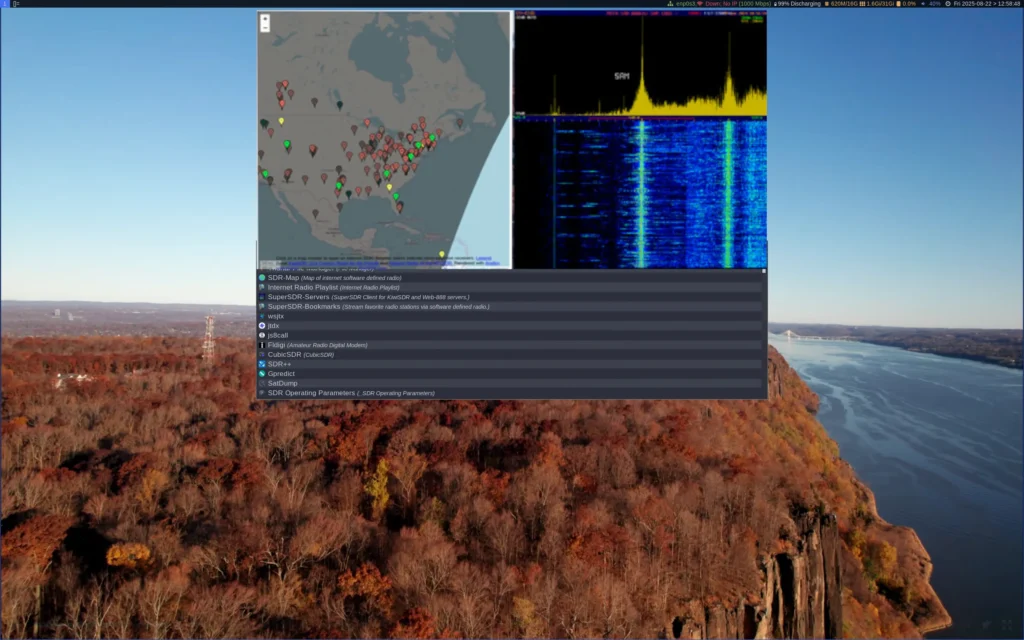
- SDR-Map — discover and connect to public WebSDR and remote receivers worldwide.
- GNURadio — a powerful toolkit for building custom signal processing flows.
- GQRX & CubicSDR — user-friendly receivers that support many hardware front-ends.
- Digital decoders — Fldigi, Multimon-NG, QSSTV, and other mode-specific tools for PSK, RTTY, Olivia, SSTV, and more.
- ADS-B & AIS — aircraft and ship tracking tools for VHF bands.
- Internet radio streamer — access studio streams and hosted broadcast channels.
- Hardware drivers — preconfigured support for RTL-SDR, HackRF, SDRplay, Airspy, and common USB tuners.
Hardware Support and Recommended Setups
Skywave Linux ships with drivers and udev rules for a wide variety of SDR hardware. For hobbyist setups, inexpensive RTL-SDR dongles offer a low-cost entry point. Users requiring higher performance will benefit from SDRplay devices or HackRF for wider bandwidth reception. The distribution also supports USB audio interfaces and external ADCs used in professional setups.
- A modern dual-core CPU (or better) for real-time processing.
- 4–8 GB RAM for general SDR tasks; 16 GB or more for wideband GNURadio flows.
- A USB 3.0 port for high-bandwidth dongles.
- An external antenna suited to your bands of interest (HF, VHF, UHF).
Design Philosophy: Minimal Desktop, Maximum Radio
Skywave intentionally uses the dwm window manager to keep the desktop footprint minimal. This choice prioritizes CPU cycles and I/O for SDR software rather than decorative desktop features. By limiting background services and using a lightweight configuration, the distribution reduces latency and avoids audio glitches during critical decoding operations.
That said, the distro remains accessible. Menus and launchers include the principal SDR applications, documentation links, and quick-start scripts so even newcomers can begin experimenting without deep Linux expertise.
Use Cases: From Hobby Listening to Research
- Amateur radio — decode digital modes, monitor nets, or run remote SDR instances for DX hunting.
- Shortwave listening — access international broadcasts and propagation studies.
- Aviation & maritime monitoring — ADS-B and AIS reception for situational awareness and research.
- Academic research — use GNURadio for experiments in signal processing, modulation schemes, or RF sensing.
- Broadcast monitoring — connect to studio streams and archive transmissions for analysis.
Installation and Live Mode
Skywave Linux offers live images so operators can boot from USB and test hardware without altering a host system. Live mode is ideal for field tests, temporary monitoring stations, and verifying compatibility with target SDR devices.
When ready to install, the provided installer guides users through partitioning, package selection, and optional driver installation for specific SDR hardware. The distro keeps the base system lean, allowing users to add only the tools they require for their workflows.
Performance Tuning and Best Practices
- Prefer USB 3.0 hosts for high-bandwidth dongles to avoid bottlenecks.
- Use a dedicated audio interface or tune the ALSA/Jack settings to reduce latency.
- Monitor CPU and I/O while running GNURadio flows — offload heavy processing to a secondary machine if needed.
- Keep the system updated, but test major upgrades in a disposable VM or on a spare USB image first.
- Use shielded cabling and quality antennas to reduce noise and improve SNR.
Legal and Ethical Considerations
Operating SDR receivers and decoding signals may fall under local regulations. Skywave Linux emphasizes lawful and ethical use: the distribution includes documentation on respecting privacy, frequency allocations, and legal boundaries. Users must ensure they comply with national laws before receiving or decoding potentially sensitive transmissions.
Community, Documentation, and Development
Skywave Linux maintains documentation, tutorials, and links to active communities where users share profiles, SDR server lists, and decoding recipes. For newcomers, these resources accelerate learning and provide tested configurations for common hardware. Advanced users can contribute scripts, GNURadio blocks, or new receiver profiles back to the project to expand the collective toolkit.
Troubleshooting Common Issues
- No device detected: check udev rules and confirm the dongle enumerates under
/dev. - Audio stutters: adjust buffer sizes, disable PulseAudio autospawn, or run a low-latency kernel if necessary.
- Poor reception: verify antenna placement, use a preamplifier, and minimize local RF noise sources.
- Software crashes: run GNURadio blocks with logging enabled to isolate failing modules and update drivers.
Getting Started with Skywave Linux
To explore Skywave Linux, review its documentation, or download the latest image, visit the Get Download of the ISO. The site provides release notes, hardware guides, and recommended antenna setups to help you get on air quickly and responsibly.