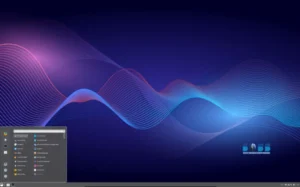
Escuelas Linux is a full-featured live operating system based on Bodhi Linux that delivers a ready-to-use educational environment for pupils and students from preschool through high school. Built around the Moksha desktop (a continued lineage of Enlightenment 17), Escuelas Linux ships with a single, fully configured user account, a broad suite of educational applications, and classroom-focused utilities designed to simplify management for teachers and IT staff. The distribution arrives in Spanish and English variants and supports both i386 and x86_64 hardware, making it suitable for many school lab setups—especially those repurposing older machines.
Why Escuelas Linux Is Tailor-Made for Schools
Escuelas Linux removes setup friction by delivering a system where the included educational applications are preconfigured and ready the moment a student logs in. That single-user approach contrasts with generic distributions that require teachers to install and configure dozens of apps before class. By offering an out-of-the-box experience, Escuelas Linux reduces training time for staff and ensures consistent behavior across hundreds of workstations.

The distribution’s lightweight Moksha desktop keeps resource usage low, which matters in classrooms with older or modest hardware. At the same time, the interface is simple enough for children to navigate yet flexible enough for older students to use productivity and research tools with confidence.
Included Educational Software — Ready to Use
Escuelas Linux bundles a wide range of applications that cover the whole educational spectrum — from early learning to advanced school projects. The selection focuses on usability and curricular relevance, including tools for reading, math, coding, multimedia, science experiments, and classroom management.
- Learning & literacy: interactive reading tools, language packs, and phonics programs.
- Math & science: calculators, geometry tools, and simulation software for classroom demonstrations.
- Creativity & multimedia: image editors, simple animation tools, and audio recording apps.
- Productivity: office suite, presentation tools, and file management utilities.
- Programming & STEM: beginner-friendly coding environments and scripts for classroom projects.
Teachers benefit because the applications are already configured with sensible defaults, shortcuts, and lesson-ready templates—so they can focus on teaching rather than troubleshooting software.
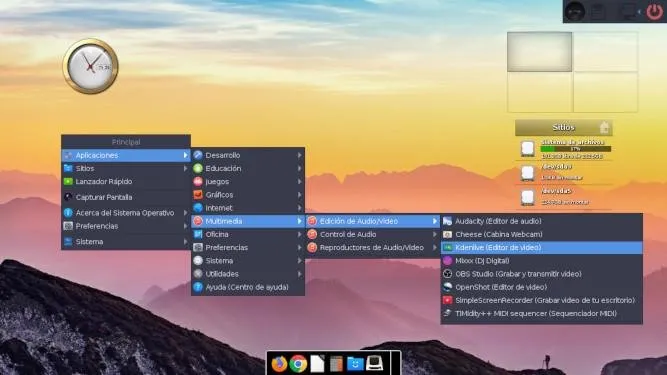
RestoreUser and ReinstateUser — Classroom Management Made Simple
Two signature utilities make Escuelas Linux particularly practical for school environments: RestoreUser and ReinstateUser. These tools drastically reduce administrative overhead and keep machines in a consistent state for every class.
- RestoreUser — instantly restores the single user account to the default configuration, resetting application settings and restoring the curated learning environment.
- ReinstateUser — removes all files created by the current user, producing a clean account state for the next student or lesson.
With these utilities, IT staff can quickly reset labs between lessons, prevent persistent user clutter, and avoid the need to reimage systems after each use. This creates predictable classroom behavior and preserves bandwidth and storage resources.
Moksha Desktop: Lightweight, Attractive, and Fast
Moksha, the desktop used by Escuelas Linux, is a modern continuation of Enlightenment 17’s philosophy: visually appealing, highly configurable, and exceptionally light on resources. The desktop offers a smooth visual experience without the performance tax of heavier environments, which means machines with modest CPUs and small amounts of RAM still provide snappy responsiveness.
Its minimal resource needs also mean longer hardware lifetimes for school fleets and lower power consumption—both important considerations for tight education budgets and sustainable IT policies.
Multilingual Support and Broad Hardware Coverage
Escuelas Linux recognizes the realities of educational institutions: mixed hardware and multilingual classrooms. The project provides Spanish and English variants and supports both legacy i386 systems and modern x86_64 machines. This inclusive approach allows schools to deploy Escuelas Linux across heterogeneous labs without forcing expensive hardware upgrades.
Teachers can therefore choose the variant that matches their classroom language, and IT teams can image multiple hardware classes with the same educational environment, keeping costs predictable.
Live System Advantages for Schools
Because Escuelas Linux is distributed as a live system, schools can run it from USB drives for testing, workshops, and temporary setups. Live mode is particularly useful for guest sessions, workshops, and demonstration kiosks where persistence is not required. It also allows rapid evaluation of the distro without altering existing computers.
For permanent setups, the distribution supports installation to disk, enabling persistence, user accounts management, and networked classroom integration. This dual-mode flexibility—live or installed—gives schools many deployment options depending on their needs.
Security, Privacy, and Child-Friendly Defaults
Escuelas Linux ships with sensible defaults aimed at protecting students and simplifying compliance. The system includes privacy-aware browser settings, safe-search defaults, and user restrictions that limit access to potentially harmful system areas. Combined with the RestoreUser/ReinstateUser tools, these defaults keep student data safe and provide a controlled environment for learning.
Deployment Tips for IT Administrators
Administrators planning to deploy Escuelas Linux at scale should consider the following best practices to maximize uptime and classroom effectiveness:
- Standardize images — create a golden USB image for each hardware class (i386 and x86_64) to simplify rollouts.
- Schedule restores — automate RestoreUser runs between class periods to keep systems clean.
- Network storage — centralize student data for portability while keeping local systems stateless where possible.
- Teacher training — brief teachers on ReinstateUser and RestoreUser so they can troubleshoot common classroom issues quickly.
Following these guidelines reduces on-the-spot technical problems and keeps the focus on teaching rather than maintenance.
Why Schools Should Consider Escuelas Linux
Escuelas Linux reduces complexity, extends hardware lifecycles, and lowers licensing costs. Its preconfigured environment helps teachers start lessons quickly while giving administrators powerful tools to maintain consistency and security. For institutions prioritizing budget, ease of use, and pedagogical readiness, the distribution is a strong candidate.
Get Download of the ISO
To explore the distribution, review its documentation, or download the ISO, simply visit the official website: Get Download of the ISO.