Unraid OS is a Linux-based operating system created to simplify the world of storage servers, home labs and multi-purpose server setups. It delivers an easy workflow for users who want a NAS, a virtualization host and a Docker container platform all in one place. The system stands out for allowing mixed-size drives, incremental expansion and a simple web interface designed for everyday users, learners and professionals managing home or office environments.
Unlike traditional RAID solutions that force strict rules and complex arrays, Unraid introduces a more flexible architecture. Users can combine drives of different sizes, add storage incrementally and keep their data protected with parity-based redundancy. This modern approach has made Unraid one of the most popular platforms for personal servers, media centers, virtualization labs and small business environments.

What Unraid OS Tries to Solve
Many people want a NAS or home server, but traditional storage systems demand advanced knowledge. RAID arrays, LVM structures and manual configurations often discourage new administrators. Unraid solves this by offering a guided experience and a predictable workflow. It transforms complex infrastructure into a friendly, web-managed system that beginners can learn quickly.
For advanced users, the appeal is even stronger. Unraid combines a flexible storage engine, virtualization through KVM and Docker container support. This enables multi-role home labs running media servers, virtual machines, databases, automation pipelines and test environments—all from a single machine.
Core Features and Technical Highlights
Unraid includes a wide range of features that make it a complete server platform. Here are the most notable components that define the system:
- Flexible mixed-drive storage — users can combine disks of different sizes instead of matching identical drives.
- Parity protection — one or two parity drives safeguard data from hardware failures.
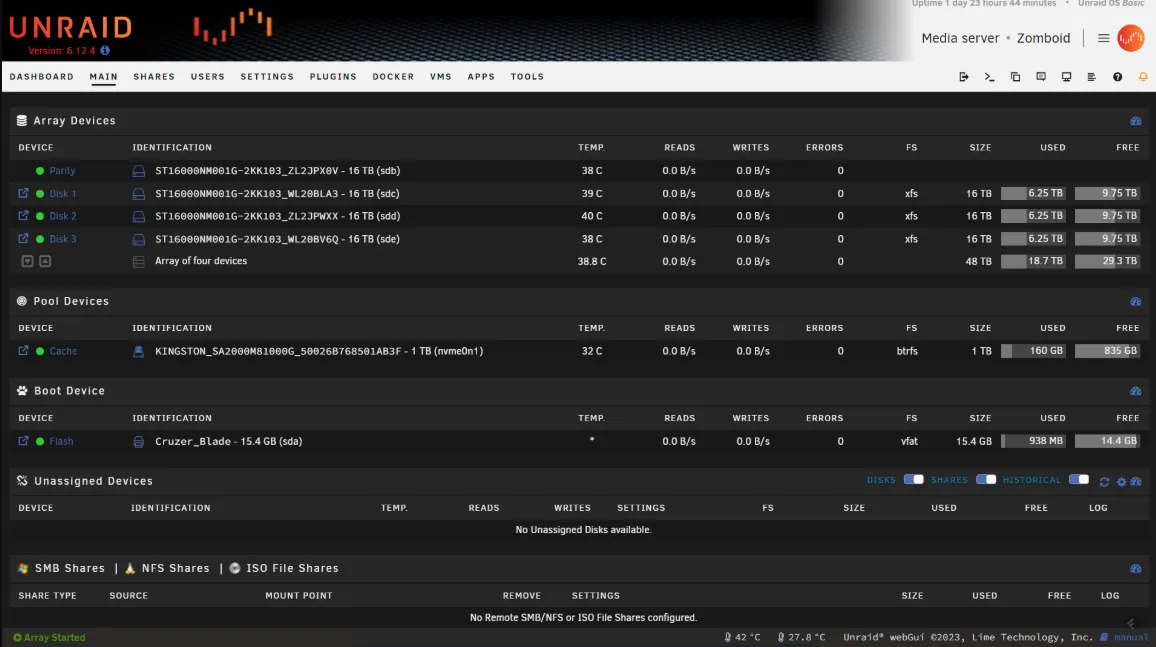
- Simple web dashboard — a clean UI for managing storage, shares, containers and virtual machines.
- Docker support — run containerized apps such as Nextcloud, Plex, Jellyfin, Home Assistant and databases.
- Virtual machine management — create Linux or Windows VMs with GPU passthrough support.
- Incremental scaling — add more drives anytime without rebuilding an entire array.
- Licensing tied to USB device — the OS boots from USB, keeping disk space dedicated to data.
- Community templates — launch containers quickly via popular pre-configured community apps.
These assets turn Unraid into a powerful foundation for a personal cloud, a development lab or even a business file server. The platform offers convenience without removing control from the user.
Storage Engine and Drive Flexibility
Traditional RAID systems require drives of equal size and depend on strict RAID levels. Unraid uses a different concept. It stores most data on individual disks while protecting them with one or two parity drives. This means users can scale the storage system by simply inserting a new disk, even if it is larger or smaller than existing ones.
This model also improves data isolation. If a disk fails, only the data on that specific disk requires reconstruction. Accessing raw data is easier because files are stored on regular filesystems rather than striped across multiple disks.
Virtualization with KVM
Unraid includes a built-in virtualization layer powered by KVM. Users can create and manage virtual machines directly through the web interface. GPU passthrough allows Windows or Linux desktops to run with near-native performance, enabling gaming setups, workstation duties or software testing environments inside the server.
VMs can be assigned dedicated cores, RAM, PCIe devices and USB peripherals. This is useful in many situations, including media editing, security labs, sandboxing and game streaming powered by the server.
Docker Support and App Ecosystem
Unraid integrates Docker at the system level, allowing users to deploy applications without installing packages manually. Popular apps include:
- Plex, Jellyfin and Emby media servers
- Nextcloud personal cloud
- Home Assistant for automation
- MariaDB, PostgreSQL and Redis for databases
- Nginx, Apache and full stacks for web hosting
- Development tools and CI/CD utilities
The community app templates help users launch these tools with a few clicks, offering great convenience for both new and experienced administrators.
User Experience and Simple Web Interface
The web dashboard is one of Unraid’s strongest points. It centralizes every operation behind a clean UI that works on desktops, laptops and mobile devices. Even users without deep Linux knowledge can manage drives, shares, users, permissions, VMs and containers.
The interface offers quick insights into system health, drive temperatures, storage usage and active workloads. Notifications warn about parity issues, SMART errors or misconfigurations. This makes Unraid suitable for people who want a server that “just works.”
Use Cases: Who Should Use Unraid OS?
Unraid fits many environments because it is both flexible and approachable. Here are the groups that benefit the most:
- Home lab enthusiasts — ideal for running mixed services such as NAS, containers and VMs.
- Media server users — perfect for Plex, Jellyfin or Emby deployments.
- Small offices — simple file sharing and reliable data protection.
- Developers — test projects in VMs or containers with isolated environments.
- Content creators — GPU passthrough enables remote desktops with high performance.
- Backup and storage-heavy workflows — flexible scaling and parity protection help long-term storage needs.
Its ability to do multiple jobs at once makes it one of the most versatile commercial Linux-based platforms available.
Performance, Scaling and Hardware Requirements
Unraid performs well on a wide range of hardware. Users can start with modest systems—such as older desktops—and expand over time. The ability to mix different disk sizes reduces upgrade costs.
When set up with SSD caching, containers and VMs load quickly and operate with strong responsiveness. GPU passthrough also enables demanding applications when necessary. For users building long-term home labs, Unraid’s incremental scaling is one of its biggest advantages.
Community, Plugins and Support
Unraid has an active community that contributes plugins, templates and support materials. The forum serves as a central hub where users share best practices, hardware recommendations and optimization guides.
In addition to the community, Unraid provides official support for paid license holders. Documentation covers setup, troubleshooting and advanced features such as dual parity, GPU isolation and network configuration.
Why Unraid Matters
Unraid successfully bridges the gap between powerful server features and accessibility. It removes the barriers of traditional RAID and makes storage management easier for everyone. By combining NAS features, virtualization and Docker support, it transforms one machine into a multi-purpose server.
Its hybrid approach appeals to enthusiasts building personal clouds, families running media servers and professionals creating flexible home labs. This combination of simplicity, flexibility and protection is why Unraid remains one of the most popular commercial NAS platforms in the Linux ecosystem.
Final Insights on Unraid OS
To explore Unraid OS, review its documentation or purchase a license, simply visit the official website: Get Download of the ISO.