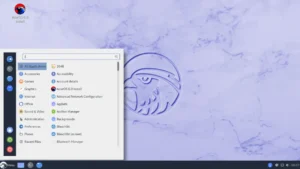
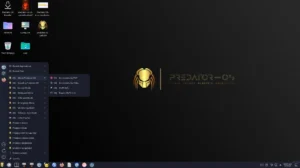
gabeeOSLinux targets users who want a fast, minimal, and customizable rolling-release desktop built on Void Linux. The project packages a selection of window managers and Wayland compositors — Hyprland, i3, Openbox, and Qtile — and pairs them with Void’s xbps tooling and a graphical OctoXBPS front end. If you value control, performance, and a streamlined desktop, gabeeOSLinux deserves a close look.
At a Glance: What gabeeOSLinux Offers
gabeeOSLinux is a Void-based respin distributed as a rolling release. It aims to bring practical desktop setups to users without hiding the internals behind heavy desktop environments. The distro offers multiple preconfigured sessions and installer options, making it approachable for users who prefer either a quick live install or a hands-on, minimal setup.
- Base: Void Linux (rolling-release philosophy and XBPS package manager).
- Window managers / compositors: Hypr (Wayland), i3 (tiling), Openbox (stacking), Qtile (tiling).
- Package tools: xbps (CLI) and OctoXBPS (graphical).
- Installer: gabeeos-installer from live media; images and ISOs available on SourceForge.
Why a Void-Based Respin?
Void provides a light, fast, and independent foundation. It uses runit for init and the xbps package system, which together deliver a pragmatic environment for rolling updates and low-overhead management. gabeeOSLinux builds on this foundation to provide curated desktop sessions and convenience tools while keeping the underlying system predictable and efficient. For projects that favor minimalism and direct control, Void is an excellent base.
Window Managers and Wayland Compositors — Flexible Desktop Choices
gabeeOSLinux ships several session options so you can pick the workflow that fits you. Hyprland gives a modern Wayland compositor experience with dynamic tiling and smooth animations. i3 provides keyboard-driven tiling for power users. Openbox delivers a lightweight stacking environment that remains easy to configure. Qtile appeals to Python-loving users who script their window manager behavior. This variety makes gabeeOSLinux useful both as a daily driver and as a testing ground for different workflows.
Packages and Management: xbps + OctoXBPS
XBPS (X Binary Package System) powers package management on Void and its respins. It gives fast, scriptable installs and updates. gabeeOSLinux keeps that core CLI tool but also ships OctoXBPS — a graphical front end that simplifies browsing, installing, and updating packages for users who prefer a GUI. Together, these tools cover both experienced maintainers and newcomers who want a more visual approach.
Installation Experience: Live ISOs and gabeeos-installer
The project distributes live images you can boot to test each desktop session. From the live environment, the provided gabeeos-installer walks users through deploying the system to disk. This approach strikes a useful balance: you can try a desktop first, then install with either guided steps or a more hands-on flow, depending on the ISO you choose. Official images and downloads appear on the project’s SourceForge page.
Performance, Footprint, and Hardware Support
Because gabeeOSLinux avoids heavy desktop environments, it maintains a small memory and CPU footprint. Openbox sessions boot quickly and consume minimal RAM. Hyprland and tiling managers offer responsive, low-latency interactions on modern hardware. The rolling-release model keeps packages current, which benefits hardware enablement, but administrators should expect to manage updates actively — rolling distributions require occasional attention to maintain stability.
Who Should Use gabeeOSLinux?
gabeeOSLinux suits users who know their way around Linux and want a streamlined, efficient desktop. If you enjoy tiling workflows, tinkering with Wayland or window manager config files, or prefer a distribution that keeps out of your way, gabeeOSLinux fits well. It targets enthusiasts, developers, and anyone who values speed and simplicity over out-of-the-box consumer polish. Novices might find the learning curve steeper, but the live ISOs and handbook pages help reduce friction.
Security and Maintenance Considerations
Rolling releases deliver fresh packages but require a maintenance mindset. Keep a routine for updates, pay attention to package changelogs, and prefer backups before major upgrades. Because gabeeOSLinux follows Void’s packaging model, many security and stability practices from Void apply here; that includes using xbps for atomic updates and building packages from xbps-src if you need custom builds.
Tips for Getting the Most from gabeeOSLinux
- Use the live image to test Hyprland, i3, Qtile, and Openbox before installing.
- Learn xbps basics: update (xbps-install -Su), search (xbps-query), and remove safely.
- Keep snapshots or backups before major rolling updates—use timeshift or rsync strategies.
- Explore OctoXBPS when you prefer GUI package management for everyday installs.
- Check the project handbook and SourceForge wiki for distro-specific tips.
Why Choose gabeeOSLinux for Desktop Users
Choose gabeeOSLinux if you want a Void-based, rolling system that gives you multiple lightweight desktop sessions out of the box. It reduces bloat, supports modern Wayland and classic tiling workflows, and exposes Void’s powerful xbps tooling while offering OctoXBPS for easier package management. The distribution fits experienced users who prefer to shape their desktop into a tool rather than accept a one-size-fits-all environment.
Ready to try gabeeOSLinux? Download official images and read the handbook on the project pages below. The SourceForge downloads host the live ISOs and installers; the project site contains documentation and session-specific notes. Always verify checksums after downloading and review installation instructions before writing media to disk.
Getting Started with gabeeOSLinux
To get started, download the image for your preferred session, create a bootable USB, and boot the live environment. Try each session to find the one that fits your workflow, then run the gabeeos-installer when you are ready to commit. Read the handbook pages for session-specific tips and post-install tweaks. Enjoy a fast, minimal desktop that stays current thanks to Void’s rolling updates.
Official The Website: Use the latest ISO for your preferred window manager session.