Quirinux GNU/Linux Distribution is a unique Devuan-based system crafted specifically for animators, digital artists, and multimedia creators who need a stable, flexible, and privacy-respecting environment. While most Linux distros aim for general usage or software development workflows, Quirinux stands apart by delivering an ecosystem entirely focused on animated film production. From 2D drawing and digital painting to CGI-3D, stop motion, cut-out animation, and motion graphics, the distro gives users an impressive suite of open-source tools ready out of the box.
Built on Devuan, Quirinux avoids systemd and embraces stability, predictability, and long-term maintainability. This foundation matters for professional artists who cannot afford system-level inconsistencies or unpredictable updates. Running the lightweight Xfce desktop environment, Quirinux blends performance with creativity, ensuring that even older hardware can run complex animation pipelines.
Why Quirinux Matters in the Open-Source Animation World
Most creative professionals rely on proprietary environments like Windows or macOS paired with commercial tools such as Adobe Animate, After Effects, or Toon Boom Harmony. Quirinux challenges this narrative by showing that a fully open-source animation workflow is not only possible but efficient. The distribution bundles a complete arsenal of artistic tools, allowing creators to build animated films without licensing restrictions or hardware limitations.
Choosing a Linux distribution designed from the ground up for animation saves time and reduces friction. Instead of manually configuring multiple tools, installing plugins, hunting for codecs, or customizing the desktop layout, users receive an environment tuned for productivity on day one. This “ready-for-production” philosophy makes Quirinux especially appealing to students, indie studios, and creators working with limited budgets.
Designed for Professional Animation Pipelines
Quirinux supports a wide range of animation techniques, which is rarely found in a single operating system. Whether you work with traditional frame-by-frame methods or advanced 3D workflows, the distribution provides tools that match your creative goals:
- Traditional 2D animation – Hand-drawn frame creation using Krita, Pencil2D, and Synfig.
- Digital / vector animation – OpenToonz, Synfig Studio, and Inkscape for hybrid workflows.
- Cut-out animation – Tools that make assembling puppet-style animations intuitive and fast.
- CGI-3D animation – Blender included with plugins and optimized configurations.
- Stop motion – Applications designed to capture frames from external cameras.
- Motion graphics – Libraries and editors that allow compositing and dynamic visuals.
This broad support gives Quirinux a unique position among Linux distros. Animation is a discipline that often requires switching between tools. Having everything centralized—and integrated—improves the workflow dramatically.
Xfce Desktop for Speed and Stability
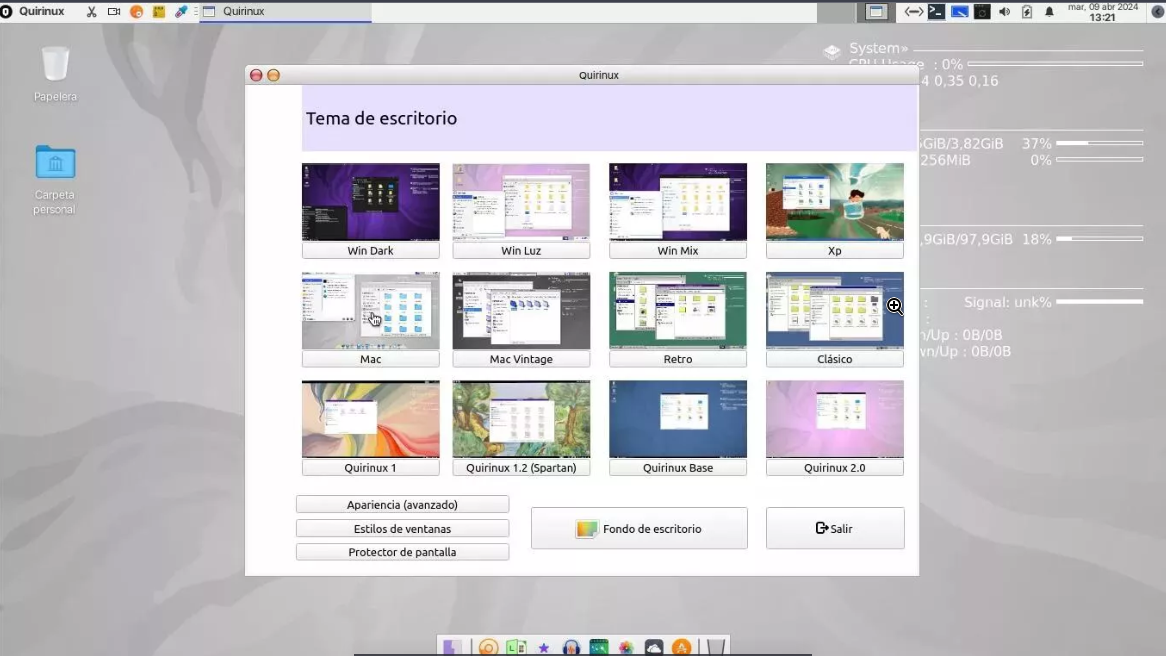
The distribution uses the Xfce desktop environment, known for being lightweight yet feature-rich. Animation software—especially 3D tools—can be resource intensive. Xfce ensures that the system itself consumes minimal overhead, freeing CPU and RAM for rendering and creative work.
Besides performance benefits, Xfce fits well with Quirinux’s philosophy of stability and simplicity. Users can customize the interface through the theming system and desktop layout options provided during installation, giving artists a clean and distraction-free space to work.
Calamares Installer for Easy Setup
Even though Quirinux targets professional users, the installation process remains user-friendly thanks to the Calamares graphical installer. This installer is widely known for its intuitive interface and reliable performance across many Linux distributions.
The Calamares-based setup ensures that newcomers from Windows or macOS feel comfortable during the installation phase. Partitioning tools, language selection, and user account configuration are presented clearly and logically, making Quirinux approachable even for artists who are not Linux experts.
Enhanced GIMP with Plugins and a Custom Configurator
One of the highlights of Quirinux is its enhanced version of GIMP. Instead of providing a default installation, the distribution includes:
- A custom GIMP configurator tool to tailor the interface for animation workflows.
- Additional plugins that boost productivity and extend the software’s capabilities.
- Preloaded brushes, palettes, and templates relevant to film and animation production.
This optimized GIMP setup saves hours of manual configuration. Artists can jump directly into drawing, creating character sheets, designing backgrounds, or producing textures for 3D models.
A Fully Free and Open-Source Creative Ecosystem
Open-source software plays a central role in modern animation. Many studios—even large ones—have integrated tools like Blender into their pipelines. Quirinux embraces this movement, giving independent creators access to a professional-grade platform without licensing costs.
Some key applications typically included are:
- Blender – Industry-level 3D creation suite with CGI and VFX capabilities.
- OpenToonz – Used by major studios for animated series and films.
- Synfig Studio – Vector-based 2D animation engine suitable for complex scenes.
- Krita – Popular digital painting software ideal for hand-drawn animation.
- Stopmotion tools – Frame capture and sequencing utilities.
- Inkscape – Vector editing essential for assets and design work.
Because Quirinux is Devuan-based, it inherits a long tradition of open-source values, stability, transparency, and community-driven development. These characteristics are particularly attractive for educational institutions and independent animation studios.
Performance, Stability, and Systemd-Free Architecture
Choosing Devuan as a base gives Quirinux an advantage for users who want predictable performance without the overhead of systemd. This systemd-free architecture appeals to technical artists who want deeper control over system processes, rendering tasks, or hardware performance tuning.
Many animation workflows also rely on scripting to automate rendering, asset conversion, backups, or batch processing. A stable environment contributes to lower downtime and faster iteration cycles during production.
Who Should Use Quirinux?
Quirinux serves multiple user groups effectively:
- Animators who want a Linux-based creative workstation.
- Indie studios looking for a cost-effective production platform.
- Students learning animation with open-source tools.
- Artists with older hardware who need lightweight performance.
- Film creators seeking a stable, privacy-respecting environment.
- Educators and labs who want open-source teaching infrastructure.
This distribution works especially well for creators tired of proprietary ecosystems or recurring software subscription fees.
Your Next Steps With Quirinux
If you want a complete open-source animation studio inside a stable GNU/Linux distribution, Quirinux offers everything you need. The curated toolset, systemd-free base, lightweight interface, and animation-focused workflow make it an ideal environment for artists who want both creative freedom and technical control.
Whether your goal is to produce a short film, experiment with 3D, or teach animation in a classroom, Quirinux gives you a powerful starting point.
Official Website & Download
- Official Site
- Download Page: Visit the official site for downloads