Keyword focus: btop Linux Tool, btop system monitor, Linux performance tool
If you spend any meaningful amount of time using Linux—whether on a lightweight setup, a rolling-release distribution like Arch Linux, or a minimal workstation built for efficiency—you eventually look for a system monitor that offers clarity, speed, and control. btop is exactly that tool. It is a next-generation terminal-based system monitor that transforms the way you observe CPU usage, RAM and swap consumption, disk I/O, GPU load, and network throughput. Designed to be fast, visually rich, and extremely intuitive, btop stands out as one of the most fantastic tools available for Linux users today.
This post dives deep into why btop has become the preferred monitoring utility for both casual users and advanced Linux enthusiasts. From its performance-optimized engine to its stunning TUI (Text User Interface), btop elevates system monitoring to a whole new level.
What Makes btop Different From Traditional Linux Monitors?
Many Linux users start with top because it’s installed by default. Others move to htop for an improved experience. But once you try btop, everything changes. The tool makes system monitoring visually engaging without compromising performance or functionality.
The key difference is that btop is not simply a “prettier htop.” It is built around efficiency, responsiveness, and usability. Unlike older tools, btop uses modern programming techniques, including asynchronous sampling, to deliver deep system insights with near-zero latency.
Its layout divides information into clear sections—CPU, memory, network, disks, processes—making it effortless to track all activity simultaneously. The result is a dashboard that is fast, readable, and immediately useful even under load.
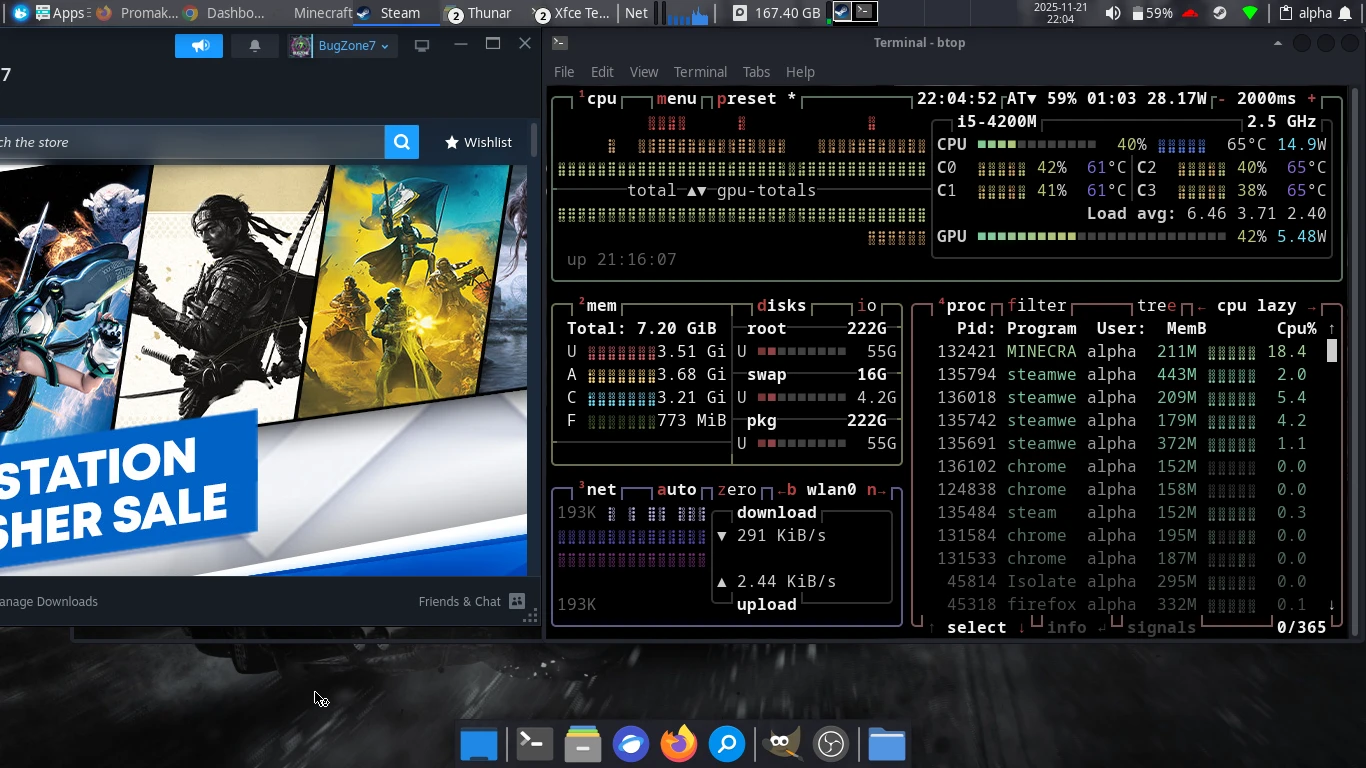
A Stunning Terminal UI With Zero Bloat
btop’s most iconic feature is its visually impressive TUI. It brings color, animation, and precision into a terminal monitor without sacrificing performance. Every panel updates smoothly thanks to optimized rendering routines that do not overwhelm your CPU.
While many tools rely on basic text rendering, btop delivers an experience similar to a graphical monitoring dashboard—but fully inside the terminal. It uses shaded bars, responsive charts, and detailed breakdowns that adapt to your terminal size. This clean presentation is one of the major reasons why Linux users praise btop as a fantastic monitoring tool.
Performance Optimization Built Into the Core
Speed is one of btop’s strongest advantages. It behaves differently from older monitors, thanks to its highly efficient backend. Resource sampling happens asynchronously, preventing lag when the system is under stress. Data is processed and displayed without blocking the terminal, allowing btop to feel fluid even on older hardware.
To accomplish this, btop uses:
- Multi-threaded performance monitoring for smoother updates
- Asynchronous polling that avoids stalls during high CPU load
- Optimized drawing routines that reduce unnecessary calculations
- Minimal overhead so your system monitor does not become part of the problem
Because of these choices, you can leave btop running for hours—or even days—without noticing any slowdown or resource spikes.
Granular Insights Into CPU, RAM, Swap, and More
Another reason btop is a fantastic Linux tool is the depth of information it provides at a glance. You get an immediate understanding of your system’s real-time behavior, which is crucial for debugging, optimizing workloads, or simply satisfying your curiosity about performance.
btop offers:
- Per-core CPU usage with temperature, frequency, and load averages
- RAM and swap dashboards showing buffers, cache, and actual usage
- Disk activity graphs with read/write speed and I/O load
- Network throughput including incoming, outgoing, and total data
- Process sorting and filtering based on any metric you need
These insights are incredibly valuable for power users, developers, system administrators, and gamers—especially on desktops optimized for performance, like Arch Linux or other rolling distributions.
Customizable to Match Your Workflow
btop includes a wide range of customization options. Whether you prefer a lightweight display, a minimalist terminal experience, or a full performance dashboard, you can tune the tool to your exact taste.
Customization options include:
- Color themes that let you adjust the aesthetic
- Panel visibility to hide or show components
- Refresh rate controls to balance detail and performance
- Sorting rules for the process list
- Status bars and indicators that can be toggled as needed
The configuration lives in a simple text file, meaning you can sync it across machines or integrate it into dotfile setups, especially if you maintain a script-based Linux environment.
Ideal for Debugging, Gaming, and System Tuning
btop is not only useful for system monitoring. It becomes a practical tool for several other Linux tasks:
- Debugging performance issues such as high CPU usage or memory leaks
- Game optimization when you want to track load, VRAM, and system heat
- Testing custom kernels or Mesa builds
- Monitoring servers without a graphical interface
- Evaluating hardware stress during benchmarking
No matter what you are doing—coding, gaming, compiling, streaming, or simply exploring—btop gives you the visibility you need.
Easy Installation on Most Linux Distributions
btop is available in the repositories of most major distributions, including Arch Linux, Fedora, Debian, Ubuntu, Alpine Linux, and Void Linux. You can install it quickly using your package manager.
Examples:
# Arch Linux
sudo pacman -S btop

# Debian/Ubuntu
sudo apt install btop

# Fedora
sudo dnf install btop
If you prefer compiling from source or contributing, you can also install it directly from the official project repository.
Where to Get btop
You can download btop, explore updates, or check documentation directly from its official repository:
Official btop Repository (GitHub)
Why btop Belongs in Every Linux Workflow
btop earns its reputation because it transforms system monitoring from a basic necessity into an efficient, elegant, and powerful experience. From its fluid terminal interface to its performance-optimized engine, the tool stands out among Linux utilities for delivering clarity and precision at all times. Once you integrate btop into your workflow, it becomes hard to imagine using anything else.