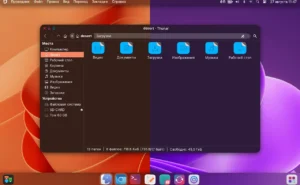
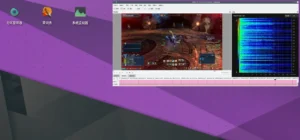
Alien-OS is a Debian-based GNU/Linux distribution created in Germany, combining stability with a modern tiling workflow through the Regolith Desktop Environment. Built on Debian’s “Stable” branch and enhanced with components borrowed from MX Linux, it provides a lean, keyboard-driven experience powered by i3 and Sway technologies.
What Is Alien-OS Linux Distribution?
Alien-OS stands out for merging the reliability of Debian with several usability improvements from MX Linux. The result is a lightweight, performance-oriented Linux system that targets desktop users who enjoy tiling window managers but prefer a polished, ready-to-use environment rather than configuring everything manually.
The distribution ships with the Regolith Desktop, a unified desktop built on top of i3wm and Sway concepts. It provides a consistent workflow with pre-configured keybindings, integrated widgets, and a UI designed for fast navigation without relying on heavy mouse interactions.
Main Features of Alien-OS Linux Distribution
1. Regolith Desktop for a Modern Tiling Workflow
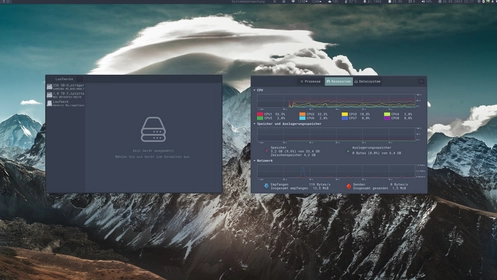
The core of Alien-OS is the Regolith Desktop — a tailored environment that transforms the traditional Linux UI into a powerful tiling-first experience. It builds on i3/Sway foundations, offering:
- A curated set of keybindings for fast window management.
- Minimal visual clutter thanks to its clean and modular design.
- Simplified configuration layers compared to plain i3wm or Sway.
- An aesthetic consistent with modern productivity desktops.
2. MX Linux Components and MX-Tools Integration
Alien-OS includes several tools borrowed from MX Linux, especially the popular MX-Tools suite. These utilities significantly improve system management, offering graphical solutions for:
- Driver installation and hardware configuration.
- System snapshots and backups.
- Boot repair and live USB customization.
- User account setup and maintenance.
This makes Alien-OS far more user-friendly than most tiling-window-manager distros that require heavy manual tweaking.
3. Choice Between systemd and SysV init Systems
Alien-OS gives users the option to run either systemd or SysV as the init system. This flexibility appeals to advanced users who want more control over service management, boot times or system behaviour.
4. Liquorix Kernel for Better Desktop and Gaming Performance
The distribution includes the Liquorix Linux kernel, a performance-tuned kernel optimized for:
- Gaming workloads
- Low-latency audio production
- Multimedia tasks
- Desktop responsiveness
This makes Alien-OS an attractive option for users who need extra performance without compiling their own custom kernel.
5. Over 20 Pre-Installed Themes
Alien-OS includes a rich visual selection of more than 20 desktop themes. These themes apply to Regolith components, the terminal, and the system UI. They allow users to personalize the experience easily without digging through configuration files.
6. OEM Installation Support
Alien-OS supports OEM installations, making it useful for system integrators, refurbishers, and professionals who want to prepare machines for clients. This option pre-configures the system so the final user performs a quick first-boot setup.
Why Alien-OS Is Different from Other Tiling Distributions
Most tiling window manager distributions require manual setup, especially when involving i3, Sway or hybrid environments. Alien-OS takes another path by giving users a ready-to-use system with advanced defaults:
- Keybindings pre-mapped and documented.
- Regolith UI layers simplifying classic i3 configurations.
- Integrated MX-Tools reducing Linux complexity.
- The Liquorix kernel providing instant performance improvements.
This approach makes Alien-OS ideal for users who want productivity from the moment they boot the system, without spending hours editing configuration files.
Performance and Resource Usage
Thanks to its streamlined design, Alien-OS runs efficiently on modern and older hardware. The Regolith environment uses fewer resources than GNOME or KDE Plasma, which leads to:
- Lower RAM usage.
- Faster boot times.
- Smoother performance on laptops and SSD-based systems.
- Better battery life for mobile devices.
The combination of lightweight UI and Liquorix kernel tuning makes the system suitable for gaming, development, creative work and multi-monitor setups.
Who Should Use Alien-OS Linux Distribution?
Alien-OS serves a broad audience due to its balance between power and simplicity:
- Developers who enjoy a keyboard-driven workflow.
- Gamers who want better performance via the Liquorix kernel.
- Productivity enthusiasts who prefer structured tiling layouts.
- Linux beginners who want tiling but dislike complex setup.
- System builders needing OEM installation flows.
The system works well for both intermediate users and advanced Linux enthusiasts.
Installation Experience and Update Model
Alien-OS follows Debian’s stability model, which ensures:
- Predictable updates
- Long-term reliability
- Security-focused package maintenance
The installer is friendly, supports OEM mode, and provides quick partitioning and configuration options. After installation, users can adjust the Regolith desktop using simple commands or by selecting one of the built-in themes.
Where to Download Alien-OS Linux Distribution
You can download Alien-OS directly from the official site:
Final Thoughts on Alien-OS Linux Distribution
Alien-OS brings a rare combination of performance, polish and workflow efficiency. By merging Debian stability, MX Linux tools, Regolith Desktop and the Liquorix kernel, the distribution delivers a fast, minimal and practical environment. It is an excellent choice for users who want a tiling window manager that works out of the box, without sacrificing power or customization.