Archriot is an Arch-based project that combines the power of Arch Linux with the Hyprland tiling window manager to produce a lightweight, privacy-focused operating system. The project ships a compact ISO and an automated installation process driven by a Go binary installer that performs atomic operations and supports instant rollbacks. Archriot targets users who want a modern tiling desktop, robust developer tooling, and an installer that reduces risk during upgrades and system changes—without telemetry or corporate data harvesting.
What Archriot Tries to Solve
Archlinux provides unmatched flexibility, but the raw installation path can be time-consuming and error-prone for users who want a ready, modern desktop with curated tooling. Archriot addresses this gap by offering a streamlined option: a small, automated ISO for quick deployments and an installer capable of converting an existing Arch system into Archriot. It aims to deliver the speed and control of Arch while minimizing repetitive setup work and protecting user privacy.
Core Features and Technical Highlights
- Arch-based foundation giving users access to Arch repositories and the Arch philosophy of simplicity.
- Hyprland by default — a modern Wayland tiling compositor optimized for performance and customization.
- Go binary installer that runs atomic installs, supports instant rollback, and automates package selection and system tuning.
- Privacy-first configuration — no telemetry, no corporate tracking, and minimal background services.
- Curated developer stack including Fish shell, Zed editor, and a preconfigured Neovim environment.
- Small ISO footprint and an automated script to convert existing Arch installations into Archriot.
These components combine to form a modern, resilient desktop tailored for people who value speed, configurability, and control. Archriot is not a heavy-handed distribution; instead, it presents a focused environment that respects user agency and time.
Installer: Atomic Operations and Instant Rollbacks
The installer is one of Archriot’s most compelling innovations. Written in Go, the binary installer orchestrates the entire setup process with atomic transactions. This design ensures that each step either completes successfully or the system reverts to the prior safe state. Instant rollbacks reduce the fear of upgrades and experimental modifications, making it easier to test new packages, kernel versions, or configuration changes without risking a broken system.
From a technical standpoint, atomic installs typically rely on careful sequencing, snapshotting, and cleanup routines. Archriot’s installer aims to encapsulate those tasks so users can concentrate on the desktop experience rather than the mechanics of package management.
Privacy and Minimal Telemetry
Privacy is baked into Archriot’s defaults. The distribution purposefully disables telemetry and avoids any form of corporate data harvesting. Background services are kept minimal and transparent, and the project publishes its defaults so that users can audit and adapt them. This approach appeals to users who want a modern desktop without the trade-off of invasive data collection.
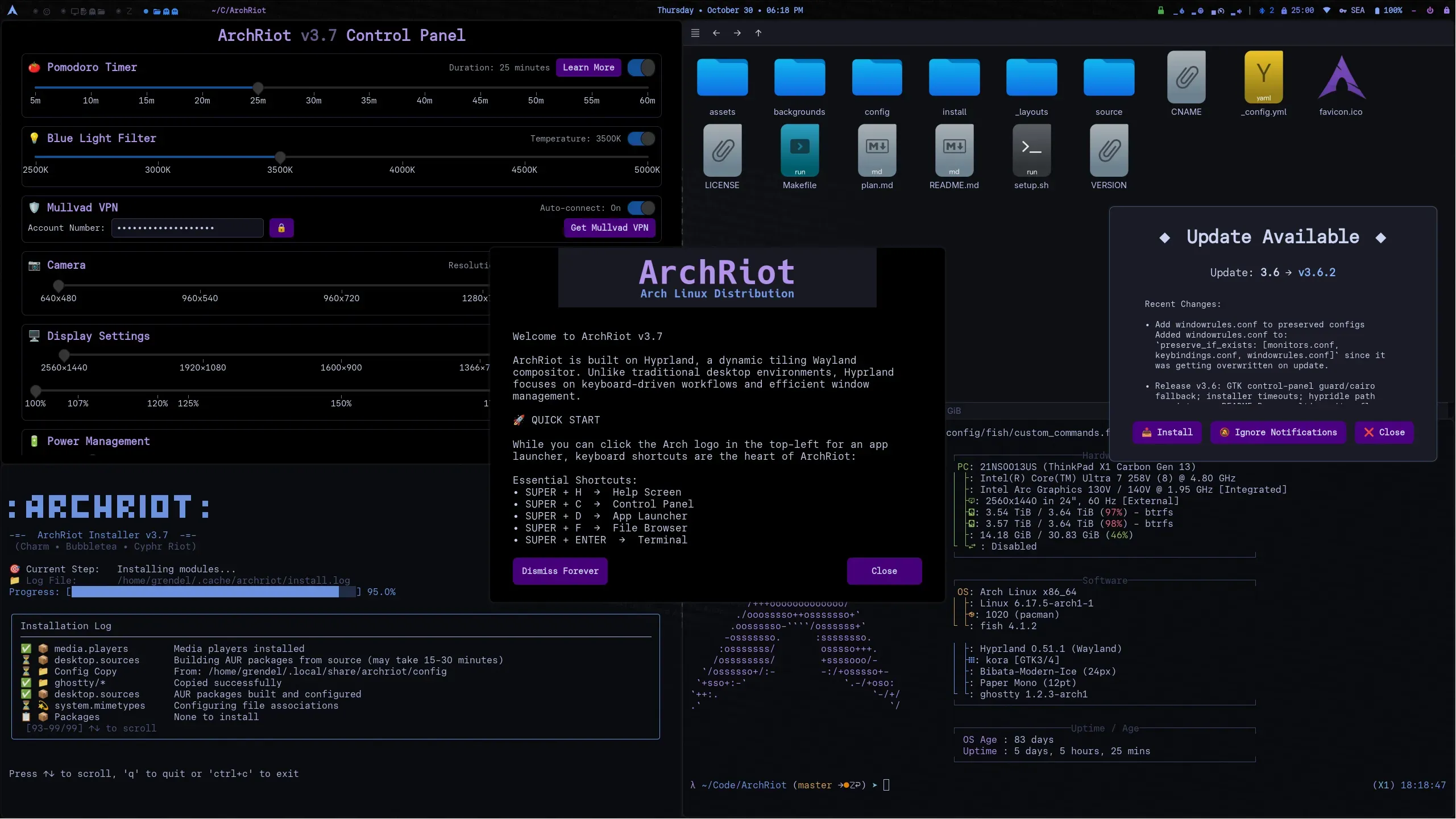
Hyprland: A Modern, Lightweight Tiling Compositor
Choosing Hyprland as the default compositor signals Archriot’s commitment to a modern tiling workflow. Hyprland offers fluid animations, Wayland-native performance, and a flexible configuration model. For users familiar with tiling principles, Hyprland provides a responsive and keyboard-centric environment that scales from compact laptops to powerful workstations.
Hyprland’s integration with Archriot typically includes preconfigured layouts, sensible keybindings, and lightweight theme choices that emphasize battery life and raw responsiveness while still looking polished in day-to-day use.
Developer Tools and Modern UX
Archriot comes preloaded with tools aimed at modern developers: Fish as the default shell for user-friendly interactive sessions, Zed for a modern, fast editor experience, and Neovim for classical modal workflows. This stack provides a low-friction environment for coding, scripting, and rapid prototyping without forcing a single editor or opinionated workflow.
- Fish shell — interactive features, sane defaults, and a pleasant command line experience.
- Zed editor — a modern code editor focused on speed and ergonomics.
- Neovim — for users who prefer an extendable, keyboard-driven editor.
- Common developer utilities like Git, build-essential toolchains, and language runtimes available by default.
Small ISO, Big Possibilities
Archriot’s small ISO is designed for fast downloads, quick USB creation, and speedy deployments. A focused payload minimizes wasted space and reduces the number of default services, keeping boot times short and resource usage low. Despite the compact size, the ISO includes everything necessary for a productive desktop: compositor, installers, developer tools, and the atomic installer itself.
For power users, the conversion script that turns a standard Arch installation into Archriot is a practical tool. It allows users to migrate existing setups without starting from scratch, applying Archriot’s configuration and curated package lists to an already personalized system.
Customization, Themes, and Visual Design
Archriot emphasizes carefully crafted dark themes and a cohesive visual identity. The UI choices prioritize readability, low eye strain, and consistent color contrast across terminals, editors, and system panels. These themes complement Hyprland’s aesthetic and provide a modern look that feels intentional rather than patched together.
Customization remains central: users can tweak layouts, keybindings, and appearance with straightforward configuration files, allowing a high degree of personalization for those who like to tinker.
Who Should Use Archriot?
- Power users and enthusiasts who prefer Arch Linux but want a fast, preconfigured Hyprland desktop.
- Developers who value modern editors and shells ready out of the box.
- Users concerned about privacy and telemetry who want sensible defaults.
- Anyone who wants atomic installation semantics with rollback capabilities for safer upgrades.
- People with existing Arch systems who want a simple conversion path to a curated Archriot configuration.
Installation Workflow and Conversion
Installation is straightforward: boot the small ISO, run the Go-based installer, and let it download and configure the required components. For users who prefer manual control, the installer exposes options for partitioning, package selection, and system profiles. The atomic operations provide peace of mind, and the rollback mechanism ensures you can revert to a previous state if a change introduces instability.
Converting an existing Arch system is done via an installation script that applies Archriot configurations, packages, and themes. This mode suits users who have invested time tuning their installations but want the benefits of Archriot’s curated defaults and safer upgrade semantics.
Community, Documentation, and Support
Archriot maintains documentation and community channels where users share installation tips, rollback recipes, theme tweaks, and conversion scripts. The project benefits from the larger Arch ecosystem while offering targeted guidance for Hyprland and the atomic installer. Community contributions help expand pre-built profiles, packaging scripts, and tested configurations for different hardware setups.
Why Archriot Matters
Archriot demonstrates that a curated Arch experience can be both safe and modern. By providing atomic installs, rollback capabilities, and a minimal Hyprland desktop, the project lowers the barrier to achieve a high-performance, privacy-respecting environment. It appeals to users who want the strengths of Arch—speed, control, and fresh packages—while reducing the operational friction normally associated with frequent updates and manual configuration.
Getting Started with Archriot
To explore Archriot, review its features, or download the ISO, simply visit the official website: Get Download of the ISO.