Asahi Linux is a pioneering Linux distribution that brings a Fedora-based open-source system to Apple Silicon devices, unlocking native performance, hardware acceleration, and a complete desktop experience on modern Macs. Designed with transparency and long-term sustainability in mind, Asahi Linux aims to transform Apple’s proprietary hardware into a fully functional, community-driven computing platform. While Apple’s AArch64-based systems are powerful, they were never intended to run Linux — making Asahi one of the most ambitious engineering efforts in the open-source world.
Whether you’re a Linux enthusiast, a power user looking for freedom on Apple hardware, or someone seeking an ethical and transparent alternative to macOS, Asahi Linux delivers a surprisingly polished experience. With support for KDE Plasma and GNOME, native GPU drivers, a reliable installer, and continuously growing hardware support, the project aims to make Apple Silicon Macs fully usable as everyday Linux machines.
Asahi Linux Distribution Architecture and Fedora Integration
Asahi Linux is built on top of Fedora, benefiting from Fedora’s clean architecture, modern tooling, SELinux integration, and commitment to upstream-first development. This foundation ensures system stability, reproducibility, and long-term maintainability without relying on downstream patches that could fragment the project over time.
- Full integration with Fedora’s package management and repositories.
- Regular rolling-style updates aligned with Fedora releases.
- Upstream collaboration for kernel, drivers, and hardware enablement.
- Focus on security and integrity through trusted Fedora infrastructure.
This upstream-first philosophy ensures that Asahi Linux remains clean, stable, and fully aligned with broader Linux development. As support for Apple Silicon grows, the improvements land directly in the Linux kernel — benefiting not only Asahi users, but the entire Linux ecosystem.
Installation Workflow and Apple Silicon Requirements
Unlike conventional Linux distributions, Asahi cannot be installed from USB devices because Apple Silicon Macs do not support external booting. Instead, installation is handled through a macOS terminal using a Python-based installer that handles disk partitioning, bootloader integration, and OS deployment automatically.
- Launch the Asahi installer in macOS using a single terminal command.
- Select your preferred desktop environment: KDE Plasma, GNOME, or minimal.
- The installer creates a new APFS partition for Asahi Linux.
- A complete boot infrastructure is generated without altering macOS functionality.
Thanks to this streamlined installer, even users unfamiliar with Apple’s complex boot architecture can deploy Asahi safely. MacOS remains fully functional, and users can easily switch between operating systems without risk of data loss.
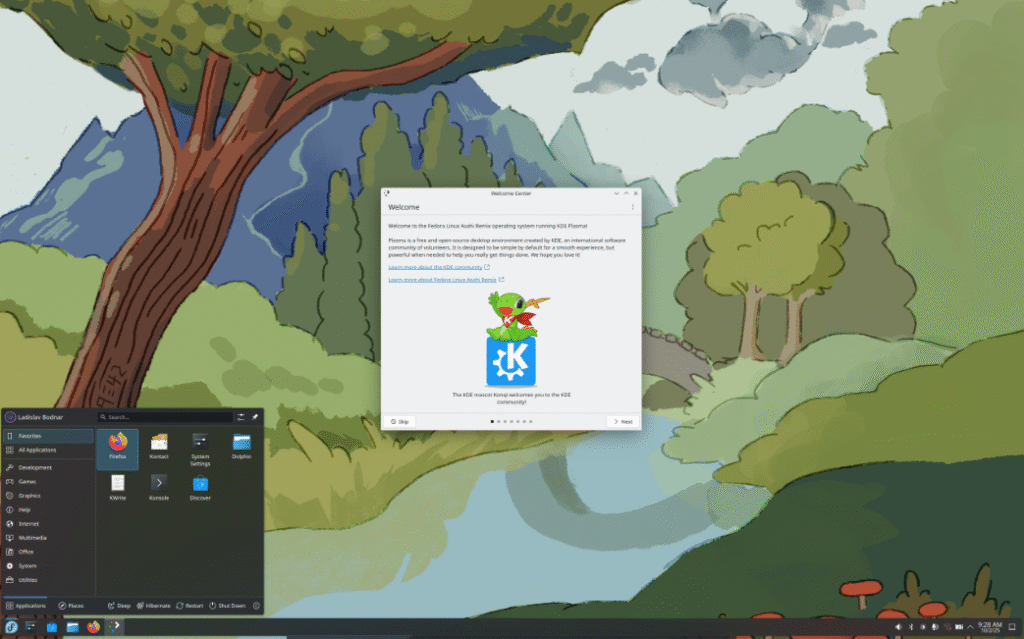
Desktop Environments: KDE Plasma and GNOME Optimized for Apple Silicon
Asahi Linux offers two fully supported desktop environments — KDE Plasma and GNOME — both optimized to run efficiently on Apple Silicon hardware. Plasma provides a lightweight yet highly customizable desktop, while GNOME delivers a sleek, modern experience ideal for touchpads and high-resolution displays.
- KDE Plasma: Smooth, lightweight, customizable, ideal for advanced users.
- GNOME: Clean interface, strong workflow design, Wayland-first.
- Minimal Installation: For users who want to build their own setup.
No matter the choice, Asahi’s Wayland-based graphics stack ensures efficient compositing, low latency, and full compatibility with Apple’s GPU architecture through their open-source driver stack.
Open-Source Drivers and Hardware Support on Apple Silicon
One of Asahi Linux’s most impressive achievements is the development of fully open-source GPU and hardware drivers for Apple Silicon. This includes support for rendering, display output, multimedia acceleration, memory management, and input devices — all reverse-engineered and implemented by the Asahi team.
- Open-source GPU driver for M1, M2, and early M3 chips.
- Hardware-accelerated video decoding and rendering pipelines.
- Optimized power management for long battery life.
- Support for Wi-Fi, Bluetooth, USB, NVMe, and Thunderbolt interfaces.
These drivers are upstreamed into the Linux kernel, making Asahi Linux not only a distribution, but a major contributor to global Linux hardware enablement.
Who Should Use Asahi Linux Distribution?
Asahi Linux is ideal for users who need a powerful, modern Linux system on Apple Silicon hardware. Its combination of Fedora stability, open-source drivers, and native performance makes it appealing to multiple user groups:
- Developers working with Linux-native tooling.
- Linux power users seeking more freedom than macOS offers.
- Security-focused users who want transparency over proprietary systems.
- Desktop users looking for a well-integrated Linux experience on Apple hardware.
While Asahi is already highly capable, it continues to evolve rapidly. With each release, camera support, GPU performance, and hardware acceleration improve, making it increasingly suitable for daily use.
Getting Started with Asahi Linux on Apple Silicon
Asahi Linux proves that open-source development can unlock the full potential of hardware once thought to be closed and proprietary. By combining Fedora’s strong foundation with cutting-edge driver work, Asahi offers one of the most unique Linux distributions available today. Whether you want a reliable daily driver or a freedom-oriented alternative to macOS, Asahi is an excellent choice for modern Mac users.
If you want to explore more Linux systems designed for desktop use, check out our other Linux distribution reviews in the PromakAI. To learn more about Asahi Linux or access its documentation and community resources, visit the official website below.
Official Website: https://asahilinux.org/