BOSS (Bharat Operating System Solutions) GNU/Linux Distribution is a Debian-based operating system designed specifically for the Indian environment, with a strong focus on accessibility, multilingual support, government usability, and the promotion of free and open-source software across public institutions in India. Developed by C-DAC (Centre for Development of Advanced Computing), BOSS GNU/Linux aims to empower users with a reliable, secure, and culturally localized computing platform suitable for government offices, educational institutions, and everyday desktop use.
By combining Debian’s stability with enhancements crafted for India’s linguistic and administrative needs, BOSS represents a distinctive approach to digital sovereignty. The distribution integrates a polished desktop, powerful applications, improved security mechanisms, and extensive language support to meet the demands of one of the world’s most linguistically diverse nations.
Understanding the Vision Behind BOSS GNU/Linux
BOSS GNU/Linux was created with a clear mission: to reduce dependency on proprietary systems and expand the adoption of free software within the Indian government and public sectors. This mission aligns with national efforts to increase digital independence and promote open technologies across the country’s IT infrastructure.
The project places special emphasis on ease of use, data security, affordability, and long-term sustainability. As a result, organizations can deploy a cost-effective and customizable system that supports routine administrative tasks, educational operations, and localized computing environments with minimal resource requirements.
Key Features of BOSS GNU/Linux Distribution
BOSS includes a curated selection of tools and enhancements designed to meet real-world needs across Indian institutions. While it remains very close to Debian, its additional components provide a more accessible and culturally adapted desktop environment.
- Extensive Indian language support: BOSS includes interfaces and input tools for Bengali, Gujarati, Hindi, Malayalam, Punjabi, Tamil, and additional regional languages.
- Government-Ready Applications: The distro features tools widely used in public offices, including document editors, PDF readers, database tools, and e-governance utilities.
- Simplified desktop experience: The system provides a pleasing visual layout with practical enhancements tailored for new and experienced users alike.
- Debian-based stability: Users benefit from Debian’s robust package base, secure repositories, and large software ecosystem.
- Security and compliance: BOSS includes hardening features and updates optimized for administrative environments.
Together, these capabilities create a distribution that simplifies everyday computing, enhances accessibility, and reduces friction for institutions seeking an alternative to proprietary systems.
Desktop Experience and Usability
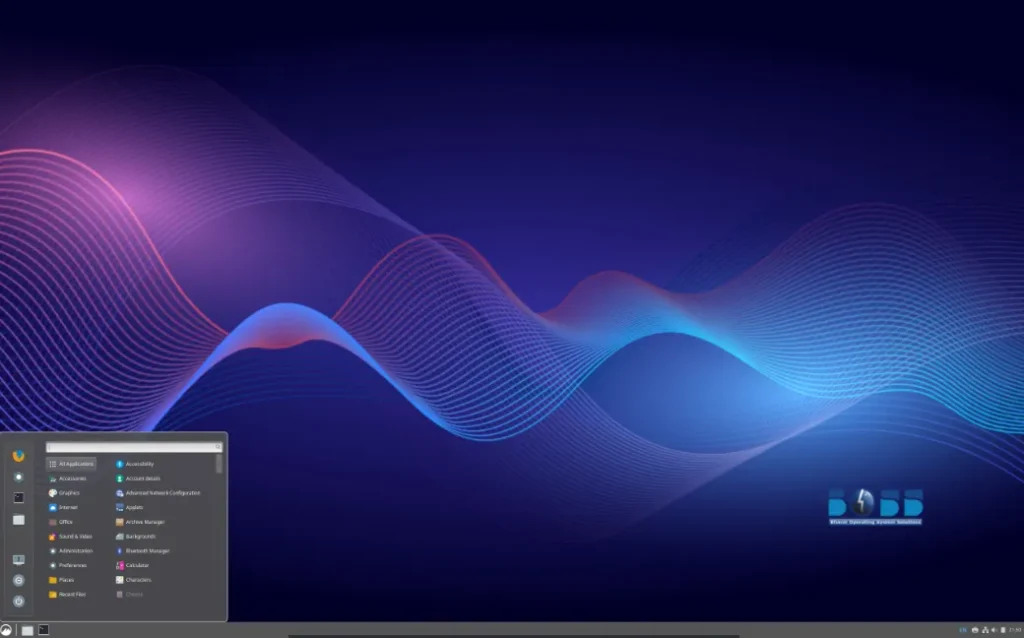
BOSS GNU/Linux provides a polished and intuitive desktop environment optimized for productivity and familiarity. While the visual layout remains lightweight and simple, users gain access to a wide range of features suitable for administrative work, creative tasks, communication, and educational use.
The system includes well-known open-source applications for multimedia, office work, programming, and system management. Whether managing government data, teaching students, or performing everyday tasks, the desktop environment offers a balanced blend of stability and usability.
Why BOSS GNU/Linux Matters for India
The importance of BOSS extends beyond technological convenience; it plays a strategic role in digital sovereignty. By promoting open-source solutions, India strengthens control over its digital infrastructure, reduces licensing costs, and expands access to localized computing resources.
This initiative has been adopted across schools, government offices, and public-sector institutions, fostering innovation and helping users build skills around Linux and open-source technologies. The emphasis on multilingual support ensures inclusivity and allows diverse linguistic communities to participate in the digital ecosystem without barriers.
System Performance and Hardware Compatibility
BOSS GNU/Linux remains lightweight and efficient, running smoothly on both modern and older hardware commonly found in government and institutional environments. Its Debian foundations ensure broad compatibility with a wide range of processors, storage devices, and peripherals.
The distribution is particularly well-suited for users who require long-term support, predictable performance, and minimal system overhead. With access to thousands of Debian packages, users can easily expand their workflows with additional tools.
Who Should Consider Using BOSS GNU/Linux?
BOSS GNU/Linux is designed with several categories of users in mind:
- Government agencies seeking secure, cost-effective systems.
- Educational institutions that require localized software and easy-to-use desktops.
- Linux enthusiasts interested in regional adaptations of Debian.
- Public-sector workers who rely on multilingual support.
- Organizations pursuing open-source transformation to reduce licensing costs and improve digital independence.
Thanks to its thoughtful design and cultural relevance, BOSS delivers a compelling balance of usability, performance, and openness.
Why BOSS GNU/Linux Stands Out for Public and Educational Use
BOSS GNU/Linux demonstrates how a distribution can meet local needs while embracing the global open-source ecosystem. Its multilingual support, stable Debian foundation, and optimized desktop experience make it a practical choice for institutions across India. Whether for classroom instruction, public administration, or general desktop use, BOSS provides a dependable and culturally relevant computing environment.
To explore the project, view documentation, or download the latest ISO, Official Website.