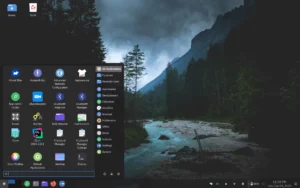
Freeduc Debian-based is a lightweight, portable Linux distribution designed for educational use. This distribution runs directly from a USB drive, which means you can access a complete learning environment without installing anything on the host computer. Additionally, Freeduc comes preloaded with tools for programming, mathematics, and science, making it ideal for students, educators, and tech enthusiasts.
Core purpose and design
The distro focuses on providing curated learning tools while remaining lightweight and secure. Consequently, institutions can standardize a teaching environment with minimal setup. Additionally, the live-media approach prevents changes to the host system, which reduces risk and administrative overhead.
Notable features
- Live USB mode (Freeduc-USB) for instant boot and use
- Preinstalled educational applications for math, coding, and science
- Low-resource footprint — works well on older machines
- Non-destructive: host systems remain unchanged after use
- Open source and easy to customize for local curricula
Deploying the live USB
First, download the ISO file from the official project page and verify the checksum. Next, write the image to a USB stick using a reliable tool. For example, use balenaEtcher or dd depending on your workflow. Finally, boot the target machine from the USB and confirm peripheral support such as network and sound.
When preparing multiple sticks for a classroom, consider creating a standardized image that includes user preferences and local resources. This saves time and ensures every station has the same setup.
Who benefits most?
Teachers and IT coordinators benefit from fast deployment and consistent environments. Students gain access to educational software without needing administrative rights. Moreover, community labs and trainers can use the live media for short workshops where installation is not practical.
Quick installation checklist
- Download ISO and verify checksum.
- Write ISO to USB with a chosen tool.
- Boot target machine and test hardware compatibility.
- Configure persistence if you need to save settings or files.
- Optionally, set up a shared cloud folder for student work.
Security and maintenance
The live environment minimizes persistent attack surface, since the system does not alter the host. Still, administrators should keep the ISO updated and verify downloads from trusted sources. In addition, enable encryption for any USB persistence to protect student data when required.
Further resources
For step-by-step setup, link internally to a detailed how-to on your site: Freeduc setup guide. For official images and documentation, use the project page: Freeduc official site.
Final assessment — should you try it?
If you need a portable, no-install educational environment, this live distribution is a practical option. It reduces setup time, simplifies maintenance, and supports older hardware. Try a single USB stick first, then scale to your fleet once you confirm compatibility and persistence needs.
Call to action (choose one):
- Download the latest ISO and create a test Freeduc-USB today.
- Try a classroom deployment with one prepared USB stick and evaluate compatibility.
- Contact your IT team to build a standardized image for bulk provisioning.