Uncom OS is an Ubuntu–based, Russian-developed commercial Linux distribution designed to provide a modern, polished, and efficient desktop experience for users across home, business, and educational environments. Created by Advilabs-Rus LLC, the system is fully localized into Russian and enhances the standard Ubuntu base with a custom app store, out-of-the-box Flatpak support, extended VPN integrations, and system management tools tailored for reliability and convenience. By offering multiple editions and a freely downloadable trial image, Uncom OS positions itself as an accessible yet enterprise-capable Linux solution for a wide range of use cases.
Unlike typical community-oriented Ubuntu derivatives, Uncom OS focuses on a commercial-grade experience that blends usability, stability, and compatibility. Its Windows-like interface, built-in management tools, and Bottles integration for running Windows applications make it a strong contender for users transitioning from proprietary systems or seeking a familiar workflow within a Linux environment.
A Refined User Experience Based on Ubuntu LTS
The foundation of Uncom OS lies in Ubuntu’s Long-Term Support (LTS) branch, chosen for its predictable upgrade cycle, long-term stability, and extensive package availability. By building on Ubuntu LTS, Uncom OS inherits its mature hardware compatibility, security updates, and solid performance while introducing its own set of enhancements and optimizations. This gives the system a level of reliability suitable for businesses and institutions that require continuity, long-term support, and minimal risk of disruption.
Localization plays a central role in the distribution. Uncom OS is tailored for Russian users, offering native language support across its interface, documentation, and system tools. This makes it a strong option for users who need a complete, cohesive desktop experience without additional configuration steps.
Key Features of Uncom OS Linux Distribution
- Custom App Store: A curated store providing a wide selection of applications with improved discoverability and easy installation.
- Flatpak Integration: Native Flatpak support allows access to thousands of sandboxed apps through Flathub and other Flatpak repositories.
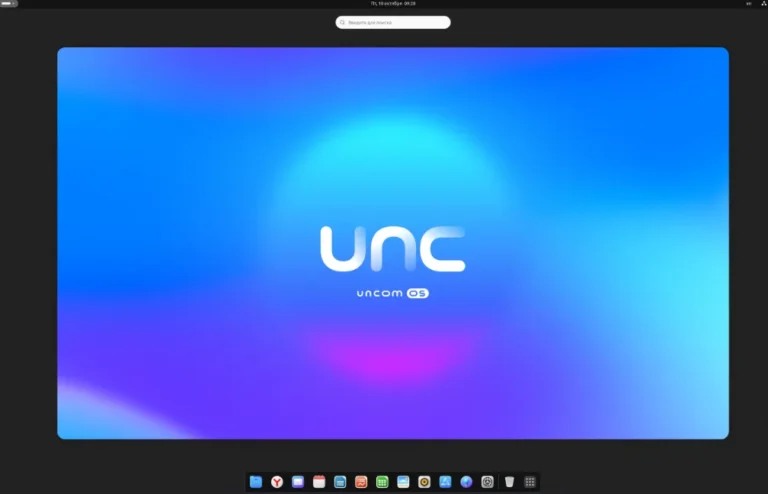
- Windows-Style Dock Panel: A familiar dock layout designed to ease the transition for users coming from Windows environments.
- Advanced VPN Support: Extended compatibility with multiple VPN protocols ensures secure connectivity for business and remote work.
- System Integrity Restoration Tool: A built-in utility that detects and repairs system-level issues for improved reliability.
- Bottles Integration: Built-in support for running Windows applications using Bottles, offering better compatibility and easier management.
- Commercial Editions: Available in Home, Business, and Education variants tailored for different use cases.
- Free Trial Version: A downloadable trial ISO lets users test the system without purchasing a license.
Together, these features make Uncom OS an appealing choice for organizations and individuals looking for a structured, dependable, and user-friendly Linux environment that includes commercial support and modern desktop conveniences.
User Interface and Desktop Experience
Uncom OS puts strong emphasis on familiarity, providing a Windows-style dock panel and desktop layout that minimize the learning curve for users transitioning from proprietary operating systems. The interface design prioritizes accessibility, clarity, and reduced cognitive load, making the environment intuitive for students, office workers, and general users alike.
The desktop environment is customized with thoughtful defaults, including enhanced menus, organized system settings, and an application launcher that makes navigation straightforward. Combined with built-in support for running Windows applications via Bottles, Uncom OS offers one of the most seamless bridges for users needing to mix Linux and Windows workflows.
Performance, Security, and System Reliability
Thanks to the Ubuntu LTS base, Uncom OS benefits from enterprise-grade stability and regular security updates. The integrity restoration application is a standout feature, providing automated diagnostics and repair capabilities that help maintain system health and reduce downtime. This makes the distribution suitable for businesses, educational institutions, and home users who rely on a predictable and secure computing environment.
Flatpak integration further contributes to system stability. By sandboxing applications, Flatpak reduces security risks and allows users to install software without interfering with core system components. This improves system longevity and makes application management more flexible.
Who Is Uncom OS Designed For?
- Home Users: Those seeking a polished, stable, and easy-to-use operating system with a familiar workflow.
- Businesses and Offices: Organizations requiring long-term support, VPN compatibility, and the ability to run Windows apps when necessary.
- Educational Institutions: Schools and universities looking for a localized, secure, and cost-effective desktop solution.
- Windows Transition Users: Individuals who prefer a Windows-like interface or need to run Windows applications through Bottles.
- Linux Beginners: Users who want a commercial-grade Linux system without the complexity of manual configuration.
With its structured editions, user-friendly design, and enterprise features, Uncom OS appeals to a broad audience while offering the reliability expected from a commercial distribution.
Getting Started with Uncom OS Linux
Uncom OS delivers a polished, Ubuntu LTS–based experience enhanced with custom tools, commercial support, and seamless app management. Whether you are exploring the Home edition or evaluating the system for business or education, the freely downloadable trial makes it easy to get started.
To explore the project or download the latest ISO: Get Download of the ISO.